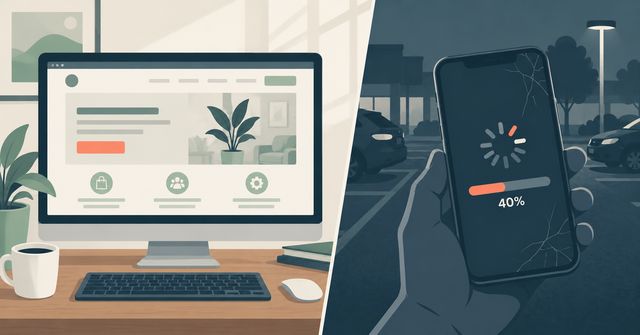
You check your website. It loads in a second or two. Looks fine. Then a customer mentions it took forever to load on their phone, or your analytics show people leaving the site within seconds of arriving. Nothing about your experience matches theirs.
This isn't a mystery, and it isn't the customer imagining things. Your website almost certainly loads faster for you than it does for them, for reasons that have nothing to do with your website design looking different to different people. It comes down to network conditions, device type, and whether your browser already has parts of the site stored from a previous visit. A customer opening your site for the first time on a phone, over a spotty mobile connection, in a parking lot, is having a completely different technical experience than you are, sitting at your desk on office WiFi with a browser that's visited your own site a hundred times.
Why your own check can mislead you
When you load your own website, your browser has likely cached pieces of it already: images, fonts, layout files. It doesn't need to fetch them again, so the page assembles almost instantly. You're also probably on a stable, fast internet connection, sitting close to the router, with no other traffic competing for bandwidth.
A first-time visitor has none of that. Their browser has to download everything from scratch. If they're on a phone using cellular data instead of WiFi, the connection is already slower and less consistent. If they're in an area with weak signal, it's slower still. None of this shows up when you test your own site, because you're testing it under close to ideal conditions every time.
This is why an owner can be completely confident their site is fast while a real customer is staring at a blank screen or a half-loaded page. The check that matters isn't "does it load fast for me," it's "what does it look like for someone with a cold cache on a mediocre connection."
What actually makes a website slow
Most of the delay usually comes from a few technical issues, and you don't need deep technical knowledge to understand them:
- Oversized images. A photo straight off a phone or camera can be many times larger than it needs to be for web display. If those files aren't compressed before they're uploaded, every page with a photo on it takes longer to load, and product or gallery pages get hit hardest.
- Cheap or overloaded hosting. Hosting is the server that stores and delivers your website. Budget hosting plans often pack many websites onto shared server space, so if another site on that server gets a traffic spike, everyone sharing that server slows down, including you.
- Too many third-party scripts. Chat widgets, tracking pixels, review plugins, booking tools. Each one is a separate piece of code loading from an outside server, and they add up. A site with a dozen of these running can feel sluggish even with fast hosting and compressed images.
- No caching or content delivery setup. Without this, a visitor 2,000 miles from your server waits longer for data to travel that distance every single time, instead of the site being served from a location closer to them.
Any one of these can cause the slowdown. Many slow sites have two or three working together.
What slow loading actually costs
This isn't a cosmetic problem. Google's own research on mobile page speed found that bounce rates were 13% for loads under three seconds and climbed to almost 60% after nine seconds. That's the difference between most visitors sticking around and most visitors leaving before the page even finishes loading.
The median mobile website load times for bounced sessions were about 2.5 seconds slower than sessions where the visitor stayed.
The revenue impact shows up even at a much smaller scale than most owners expect. Deloitte's "Milliseconds Make Millions" study found that retail conversions increased by 8.4% and average order value increased by 9.2% from a load time improvement of just one-tenth of a second.
The pattern is the same: speed determines how many of the people who find your site stick around long enough to become customers. A site that's slow isn't losing customers to a competitor with better prices or service. It's losing them before they see any of that, because the page didn't finish loading.
Speed also affects whether you show up at all
Page speed also affects what happens before someone lands on your site, because it's one of the signals Google uses to decide how a site ranks in search results, particularly on mobile. A slow site often converts worse and gets less search traffic to convert in the first place.
What to actually check
You don't need to become a developer to check this. Google's PageSpeed Insights tool will test your actual site and flag specific issues, not just give you a vague grade. Run it on a few of your most important pages, not just the homepage, since a booking page or product page loaded down with images often tells a different story than the homepage does.
If the report points to large images, unoptimized code, or too many third-party scripts, those are fixable without a full rebuild. If the core problem is the hosting itself, the fix is larger, but it's often the single highest-impact option.
Key Takeaways
- Your own website check can mislead you because your browser caches your site and you're likely on a faster, more stable connection than a first-time mobile visitor.
- Oversized images, cheap shared hosting, excess third-party scripts, and missing caching are the most common causes of slow load times.
- Google's own research found bounce rates climbed from 13% on fast-loading pages to nearly 60% on pages that took over nine seconds to load.
- Deloitte's research found that a load time improvement of just one-tenth of a second raised retail conversions by 8.4%, showing that even tiny delays can matter.
- Page speed also factors into mobile search rankings, so a slow site can mean fewer visitors in addition to converting the ones it does get at a lower rate.
If your site is losing visitors before they see what you offer, that's a fixable technical problem, not a design or content one. Mindstate Strategy's web development work includes diagnosing where a site is losing speed and fixing the cause. Contact us to have your site tested against real-world conditions instead of a best-case check from your own desk.