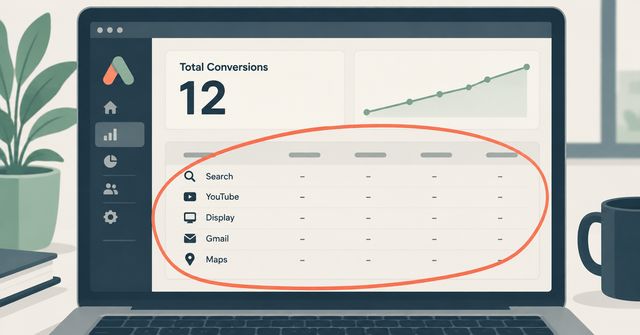
You log into Google Ads at the end of the month. Spend is there. Conversions are there. A total cost-per-lead number sits at the bottom. What isn't there is any way to tell whether those leads came from someone searching on Google, watching a YouTube video, scrolling a partner website, or opening an email in Gmail. You ask your ad rep or your agency where the budget actually went, and the answer is some version of "it's optimizing across channels."
That vague answer usually traces back to one specific campaign type: Performance Max. If your account is running it, and most Google Ads accounts set up in the last two or three years are, Google is pooling your budget across Search, YouTube, Display, Gmail, Discover, and Maps and letting an automated system decide the mix. Performance Max reporting is deliberately limited. Google provides less transparency into PMax than any other campaign type — no query-level search term reports by default, no placement-level CPA data, no asset combination reports. That's not a bug in your account. That's how the product works by default.
Why the campaign type hides this from you
Performance Max was built to run one campaign across every Google surface at once instead of you managing separate Search, Display, and YouTube campaigns by hand. The tradeoff for that convenience is control. Unlike other campaign types, PMax doesn't offer detailed breakdowns of where your ads are actually being served or who exactly is seeing them. The algorithm is making real-time decisions about which surface, which audience, and which creative combination to show, and it isn't required to show you its reasoning.
At a modest monthly spend, the blind spot may be tolerable. At a serious budget, it becomes harder to ignore. You cannot see which placements receive your ads, or what share of impressions, clicks and conversions each channel type accounts for. Without that visibility, budget can move into poorly performing, low-quality inventory and drain quickly with no explanation in the dashboard, even while aggregate ROAS still looks respectable.
A local business running Performance Max for the first time might see conversions holding steady and assume everything is fine, without realizing a chunk of the spend went toward YouTube inventory or app placements that had nothing to do with anyone actually looking for what they sell.
Google has started closing the gap, slowly
The blind spot has narrowed. Over the past couple of years, Google has added reporting layers specifically because this was one of the most common complaints from advertisers. The search terms report shows the searches that triggered your Performance Max ads, along with how those searches affected campaign performance. That report didn't exist for years. This change answers part of a major criticism of Performance Max campaigns: lack of visibility into which search queries trigger ads.
Landing page and search term visibility are real shifts, but they're still opt-in, still newer, and still not identical to what you get from a standard Search campaign. If nobody on your account has gone looking for these reports, they're easy to miss, because Performance Max doesn't surface them by default in the main dashboard view.
What you can control right now
Performance Max has a few controls worth checking today, even if an agency is running your account for you:
Brand exclusions. Without this setting, Performance Max often shows ads to people already typing your business name into Google. It counts that as a win, when in reality that customer was coming to you anyway. Excluding your own brand name forces the campaign to prove it's earning conversions from people who didn't already know you.
Placement exclusion lists. You can't block a bad placement inside Performance Max the way you can in a standard Display campaign; the main workaround is account-level placement exclusions, which apply across all campaigns including Performance Max and are managed under Tools > Shared Library > Placement Exclusion Lists. Pulling the placement report and blocking low-quality apps or sites at the account level is manual work, but it's real control.
Search terms and landing page reports. Once these are turned on for your account, they show which actual queries and pages are driving results, the same way a standard Search campaign always has. The search terms report shows which queries are delivering conversions and which may be draining budget without producing results, so creative and targeting can be aligned with actual user intent.
None of these restore full manual control. They give you enough visibility to catch obvious waste and to ask better questions about where the money is actually going, instead of trusting a single number at the bottom of a report.
What this means for how you spend
The core issue isn't that automated campaign types are bad. It's that they were built to optimize for Google's own definition of a good outcome, not necessarily yours, and the reporting only recently started catching up to let you check its work. If you're running Performance Max and nobody has looked at the placement report, the search terms report, or checked whether brand exclusions are turned on, there's a real chance part of that budget is going somewhere you'd cut immediately if you could see it clearly.
Key Takeaways
- A single lump conversion number with no channel breakdown usually means your account is running Google's Performance Max campaign type, which pools budget across Search, YouTube, Display, Gmail, and Maps under one automated system.
- Performance Max was built with less reporting transparency than standard Search or Display campaigns, and that opacity was intentional on Google's part, not a technical limitation.
- Google has added search terms reports and landing page reporting to Performance Max in recent updates, but these features are newer, often not visible by default, and worth checking for on any active account.
- Brand exclusions and account-level placement exclusion lists are the two concrete tools available today to stop obvious budget waste inside Performance Max.
- Checking these settings doesn't restore full manual control, but it's enough to verify whether ad spend is going toward people actually looking for what you sell.
If your Google Ads account is running on autopilot and nobody can tell you where the budget actually went last month, that's worth a second look. Mindstate Strategy's paid ads service audits exactly this kind of account, and you can get in touch to have someone walk through what your campaigns are really doing with your money.