A customer messages your website chat widget at 9 PM asking to move Saturday's appointment to Sunday. The bot gives a polite answer, says someone will follow up, and stops there. The customer wakes up Monday still unsure if the change went through, and now someone on your team has to call them back to sort it out manually. The bot answered. It didn't fix anything.
That gap does not mean chatbots are useless. It points to a specific, fixable limitation: most chatbots are built to generate a good-sounding response, not to reach into your booking system and change a real record. Yes, a modern chatbot can reschedule an appointment, update an order, or check a real-time status, but only if it's connected to the system that holds that data and has permission to act on it. A bot that's only trained on your FAQ page or website content can talk about your business. It can't touch it.
Two Different Things That Look the Same
From the customer's side, a chatbot that answers questions and one that completes tasks look identical. Same chat window, same friendly tone. The difference is entirely in what happens behind the interface.
A conversational chatbot works off of content: your service descriptions, your hours, your policies, maybe your FAQ. If someone asks about something covered by that content, it can answer. When someone asks it to do something, like move a booking or apply a discount code, the request has nowhere to go except back to a human. It can describe the action. It can't execute it.
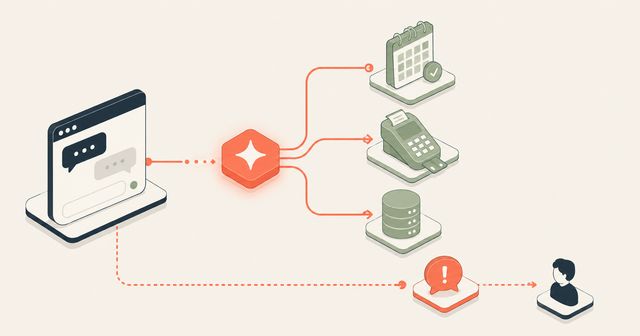
A connected chatbot, sometimes called an agentic or action-taking system, is wired into the tool that holds the data, your scheduling software, your point-of-sale system, your CRM. When a customer asks to reschedule, the bot doesn't guess or promise to follow up. It checks real availability, makes the change, and confirms it the way a staff member would if they were sitting at the front desk with the booking calendar open.
A Concrete Example
Picture a dog groomer who takes appointments through a scheduling app. A regular customer texts the shop's chat asking to push their Thursday slot to Friday because of a work conflict. With a standard chatbot, that message either goes unanswered until a human checks it, or gets a generic reply asking the customer to call during business hours. With a connected system, the bot checks Friday's open slots in the scheduling software, offers the two times that work, and locks in the customer's choice the moment they reply, no staff member touching it at all.
The value isn't that the bot sounds smart. It's that the task gets done without anyone on the team stopping what they're doing to do it manually.
Why This Matters More Than It Used to
Customers have gotten used to fixing small things themselves without waiting on a person. Salesforce's own research found that 61% of customers would prefer to use self-service to resolve simple issues.
Rescheduling an appointment, checking an order status, and confirming a reservation are the simple tasks behind that preference. When a business can't offer that without a phone call, it's asking customers to do more work than they expect to do.
The wrong version can backfire. Nearly half of respondents in a ServiceNow survey said modern chatbots fail to understand their questions and concerns. That is what happens when a bot only talks: it guesses at answers or loops the customer back to a form instead of confirming or denying a request with real data. A chatbot that can check your calendar and tell a customer "Friday at 2pm is open" builds trust in a way that a chatbot guessing at availability never will.
Where the Line Should Be
Not every action belongs in a chatbot's hands, and a well-built one should know the difference. Rescheduling within existing rules, checking order or appointment status, and updating contact information are low-risk and well suited to automation because there's a clear right answer the system can check against. Refunds above a certain amount, complaint handling, or anything requiring judgment calls should route to a person, with the bot handling the intake and handoff cleanly instead of pretending it can resolve everything.
Building this kind of system starts with mapping which requests are common, repetitive, and rule-based enough to automate safely, then connecting the chat interface to whatever system already holds that data. A smarter off-the-shelf chatbot is not the point. The point is the connection between the conversation and the record that needs to change.
What This Costs a Business That Skips It
Every one of those "I'll have someone follow up" moments is a small tax on staff time and customer patience. Multiply it across a week of rescheduling requests, status checks, and simple updates, and it adds up to hours of manual handling for tasks that didn't need a person at all, plus a slower, more frustrating experience for the customer on the other end.
Key Takeaways
- A chatbot that only answers questions from website content cannot reschedule an appointment or change a real record; it can only describe what it would do.
- A chatbot connected directly to a business's scheduling, POS, or CRM system can check real data and complete actions like rescheduling, status checks, and updates without staff involvement.
- Low-risk, rule-based requests such as rescheduling or status checks are good candidates for automation; anything requiring judgment, like refunds or complaints, should still route to a person.
- A bot built only to talk, without a system connection behind it, is more likely to frustrate customers by guessing at answers it can't confirm.
Mindstate Strategy builds chatbots that connect directly to the systems your business already runs on, so customer requests get completed instead of just acknowledged. If your chat widget is stuck answering questions instead of solving them, visit our chatbot development page or get in touch to talk through what's worth automating first.